What is in the download
Two PDF sheets and one PNG, all free, no sign-up.
- Template, A4 · trading-card-template-a4.pdf. Nine blank cards on one 210 × 297 mm sheet.
- Template, US Letter · trading-card-template-letter.pdf. The same nine cards on an 8.5 × 11 in sheet.
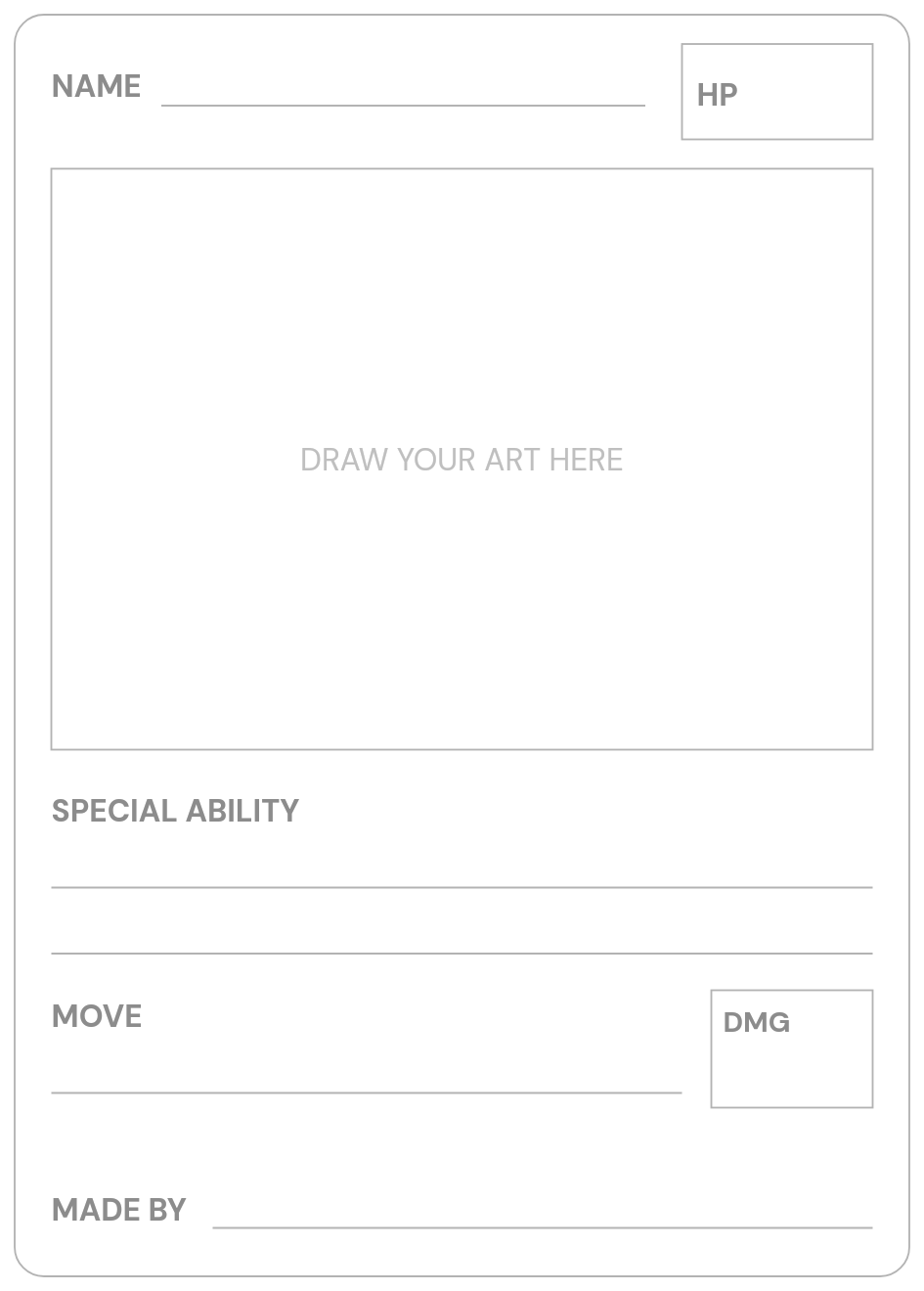
- One blank card, PNG · blank-trading-card.png. A single card at 945 × 1,320 px for filling in on a tablet or in a drawing app.
Every card has six parts: a name line, an HP box, a large art box, an ability line, a move with a damage box, and a “Made by” line. Each is 63 × 88 mm. Dashed cut lines run through the gaps between the cards, short marks in the margins line up with every card edge, and a 50 mm calibration bar lets you check your printer before you cut.
Both are free. The paper template and the digital studio cost nothing, with no sign-up. Only new AI artwork in the studio uses a credit, and the first one is free.
A4 or US Letter?
Pick the sheet that matches the paper in your printer. The cards are the same size on both; only the margins change.
| Sheet | Paper size | Common where | Cards |
|---|---|---|---|
| A4 | 210 × 297 mm | Most of the world | 9 |
| US Letter | 8.5 × 11 in (216 × 279 mm) | United States and Canada | 9 |
Not sure? Check the paper packet or your printer’s default paper size. Printing the A4 file on Letter, or the other way round, keeps the cards at 63 × 88 mm at 100% scale, but a row may be clipped.
Print it at the right size
- Open the PDF and press Print.
- Choose the same paper size you downloaded.
- Set scale to 100% / Actual size and turn off “Fit to page”.
- Print one test sheet on plain paper.
- Measure the calibration bar with a ruler: exactly 50 mm, just under 2 inches. If it is shorter, the printer is shrinking the page; find the scale or “Fit” setting and switch it off.
- Print the real sheets, on heavier matte paper if your printer accepts it.
- Cut along the dashed lines between the cards; for the outer edges, line a ruler up with the marks in the margins. An adult helps younger children here.
Printer margins vary. If the outer edge is clipped, the middle cards are still fine, and the digital print page can print fewer cards per sheet.
How to fill in a card by hand
Pencil first, then marker. Work from the top down and the card tells its own story.
- Name. Who is this? A pet, a character from a book, an invented creature, or you.
- HP. Pick a number between 10 and 300. Tens are easiest to add up in a game.
- Art box. Draw big and fill the box. Thick dark lines read well across a table. Color last.
- Ability. One short sentence about what makes them special. Funny or true, both work.
- Move and damage. A move name and a number from 0 to 200. Name it after a real habit or a favorite thing.
- Made by. The artist’s first name or nickname. On a gift card, this is the from-line.
A worked example
| Field | What Maya wrote |
|---|---|
| Name | Captain Bubbles |
| HP | 60 |
| Art box | A goldfish in a tiny captain’s hat, crayon-blue sea behind him |
| Ability | Never forgets where the food is |
| Move | Tidal Flip, 30 damage |
| Made by | Maya |
Captain Bubbles is Maya’s goldfish. Nothing about the card is fancy; it is funny and true, which is what makes it worth keeping. For an energy type, color a small circle next to the name: yellow for electric, blue for water, green for grass.
Ideas for a whole sheet
Classroom character studies
Give every student a card for a character from the book you are reading. The drawing shows the character at an important moment, the ability is what they want, and the move is what they do about it. The HP box is a good place to argue about how brave someone really is.
A rainy-day set
Agree on one rule for the sheet, such as “every card is a vegetable” or “everyone lives in the same forest”, then fill all nine. A shared rule turns nine drawings into a set, and gives the slower drawer something to borrow.
A party activity
Leave a stack of blank cards and markers on a table. Guests draw themselves as heroes while they wait for cake, and the card goes home in the goody bag. Print and cut a day early; it takes longer than you expect.
A family team
One card for each person in the house, including the dog and the goldfish. Everyone draws someone else, writes a kind ability line, and signs Made by. Pin the team on the fridge, or play a quick two-player game.
When to use the digital studio instead
Paper is right when the drawing is the point. The free studio is right when:
- you want a real photo on the card. It stays in your browser, and the card is ready in a minute;
- you want the holographic shine and the 3D tilt, saved as an interactive file that flips;
- a child would rather type a name and pick an energy than letter it by hand;
- you need the same card many times, such as one for every party guest;
- a drawing deserves an illustrated version. AI paints a new picture from it; one credit, and the first is free.
Or mix both: draw on the template, photograph it in daylight, and add the photo in My photo. The drawing guide shows how a doodle becomes a card either way, and the ideas page has twelve finished examples.
Questions about the template
What size are the cards?
63 × 88 mm, the usual trading-card size, so ordinary sleeves fit. The digital studio prints at the same size, so paper and studio cards mix in one deck.
What paper should I use?
Plain paper for the test sheet and for marker drawings. For a sturdier card, use the heaviest matte paper your printer accepts; the print guide covers paper weights and sleeves.
How do I cut them neatly?
Cut the long lines first, then the short ones. A paper cutter or a ruler and craft knife give the straightest edges; scissors are fine for a party.
Are card backs included?
No, fronts only. For a matching back, glue a plain colored sheet on before cutting, or use a sleeve with a spare card behind it.
Can I sell cards made with the template?
The template is for personal use: home, classroom, parties and gifts. Please do not sell cards or sheets made from it.
Is this an official product?
No. DIY Poké Card is a fan-made, independent studio, not affiliated with The Pokémon Company or Nintendo. The template is an original layout, and what you draw on it is yours.